Blogging about Microsoft Fabric, Power BI, Power Platform and other things I find interesting.
Tuesday, January 10, 2023
Power BI 2022 In Review: My Favourite Features
Friday, December 30, 2022
Closing out on 2022

Blogging
Speaking
I've had some great speaking gigs this year, like a virtual presence at SQLBits, The Dutch Power BI User Day (Deep Dive as well as the free Saturday), DataGrillen, and (both virtual) New Zealand Business Applications Summit and the Pakistan Power Platform Bootcamp.
MVP
Learning goals
Are you still interested in taking this exam? Have a look at my overview post.
I didn't do much reading, in books that is. I've read numerous blog posts, but not really any books. Let's up that game in 2023 and put in effort to do more reading.
I do like listening to podcasts, ranging from running (Susy Q&A, Klaas en Koen lopen weg) to tech (Knee-Deep in Tech, Kasper on BI, Explicit Measures). I like to listen to them during my morning or lunch walks and sometimes during running also.
Powerdobs
However, I missed the point of being with my hands on the buttons of Power BI a bit, so I couldn't resist taking the chance to join this family of Power BI enthusiasts at Powerdobs. And it truely feels like a little family here! π
Sports/health
I did a half marathon today! Not the wanted PR, but still satisfied I completed it! #runhappy pic.twitter.com/rJ2sEsnVIF
— Nicky van Vroenhoven (@NickyvV) October 9, 2022
I've also been doing some cold showers and Wim Hof (a.k.a. the Iceman) breathing exercises once in a while the last year. But in the beginning of October I've had the pleasure of attending a Wim Hof (half day) workshop, on mindset, breathing and cold. So I took an ice bath! π
After that day, I've been consistently doing a cold shower every morning now! It feels amazing going through that stress and adrenaline rush in the morning, and feeling relaxed after a few seconds of focussing on my breathing.
I just have to get the breathing exercises incorporated more into my daily routine also.
That's all for this year. I whish everyone the best New Year's Eve and a great start of 2023!
Nicky. Out.
Monday, December 19, 2022
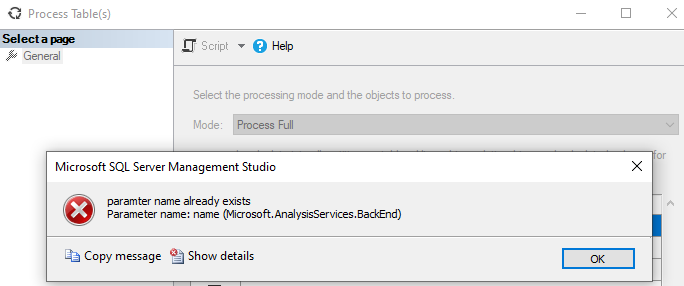
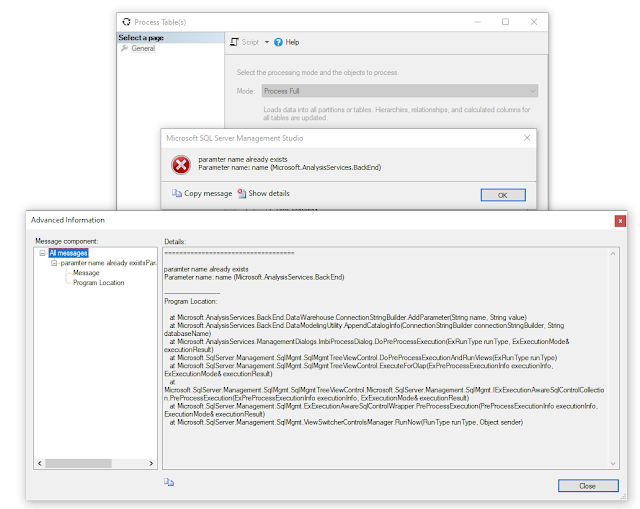
SSMS Error when refreshing a Power BI Table: Paramter name already exists
2 weeks ago I talked about A No-Code Method to Refresh One Table From a Power BI Dataset in the Service. I recently ran into an error using this method, so I thought it was worth sharing this error, and the solution π, with you.
TL;DR
Problem
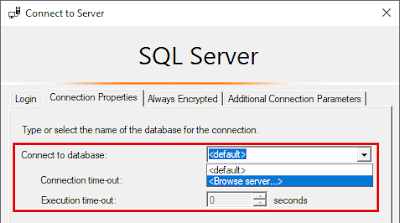
"With some tools it might be necessary to also provide the Initial Catalog (the dataset to connect to in your workspace). The datasets in your workspace will eventually show as databases under your AS-server:"
- Note that the message itself also has a typo in it (paramter π).
- It happens to every table in every dataset (I tried so far) in this workspace. I tried another workspace and that refreshed fine from the UI.
- A colleague is getting the same error message in the UI for this particular workspace.
- Looking at the error I checked if there are params called name in the datasets, but there aren't.
- It's a test workspace in a deployment pipeline.
Solution
- Don't use the Initial Catalog option in combination with SSMS, leave it at <default>
- Or, if for any reason you need the above option selected, install SSMS 19 Preview 4
- This preview version is a side-by-side installation, so it installs next to SSMS 18.x
Monday, December 5, 2022
A No-Code Method to Refresh One Table From a Power BI Dataset in the Service
Context
A few weeks back I was working on a dataset at a client where I needed to import Excel files from a folder into said dataset. I filtered the files on a prefix and loaded around 30 files of the same structure to a table in my dataset. The Excel files are exports from a budgetting system (I know, right?) that have to be updated multiple times in the next coming weeks on an ad-hoc basis.
After the Excel files are updated I currently have 2 choices:
- Open the pbix-file and refresh the specific table that loads the files, and then publish to the service. This however again triggers a refresh in the service after publishing. Depending on the connection I have in the pbix (subset of rows from dev/test/prod) I might have to wait for the refresh in the service anyhow
- Refresh the dataset in the service and wait for that to finish
Solution
But as you might have noticed from the title of this blog, there is also another solution π.
Spoiler alert: you do need a Premium license.
Marc Lelijveld previously talked about the automation of triggering a single table to refresh in the Power BI Service, with PowerShell and a TMSL script.
But what if you're not (that) familiar with PowerShell and / or TMSL? And maybe it's not going to be part of an automated schedule, but you just want to be able to execute it ad-hoc, when necessary?
Luckily there's the XMLA endpoint to the rescue. You can connect to any Premium (Capacity or Per User) workspace via the XMLA endpoint with SQL Server Management Studio (SSMS) to do a (single) table refresh.
There's a few things you'll have to consider before being able to do this..
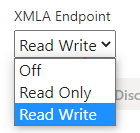
- Enable XMLA read-write
- Get the XMLA endpoint connection string
- Connect via SSMS
- Refresh your table(s)
- Check the outcome of the refresh in SSMS
- Or alternatively check the refresh history in the service
Enable XMLA read-write
XMLA Endpoint connection
Connect via SSMS
- Azure Active Directory - Universal with MFA
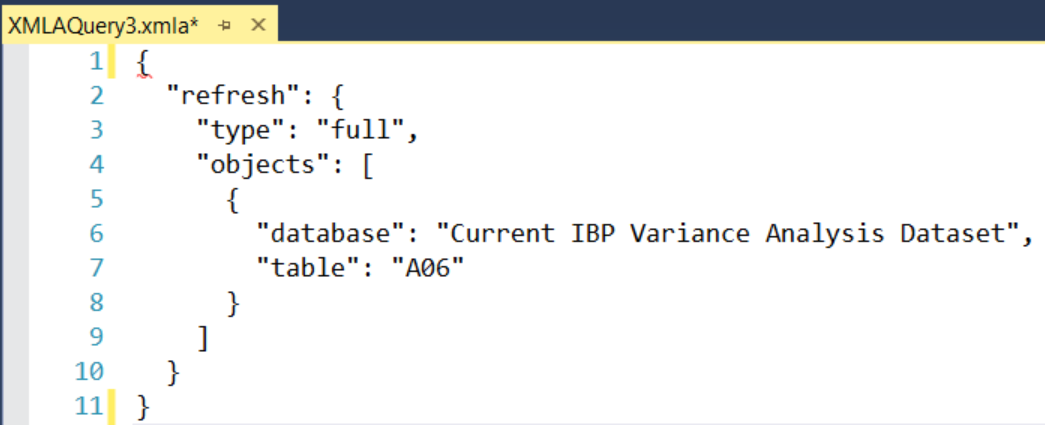
Refresh your table(s)
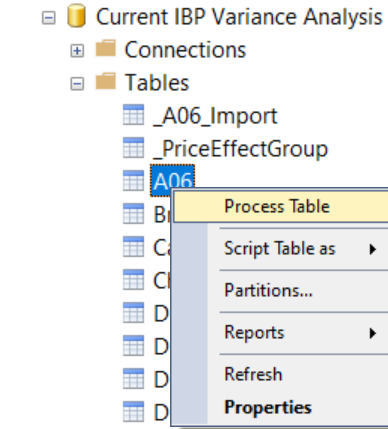
- Right-click the table you want to refresh and select Process Table
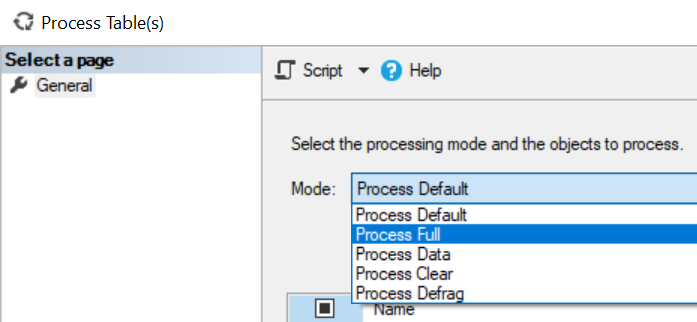
- Select the right processing option depending on your needs, I used a full refresh
- Optionally select other tables to refresh
- Click OK and wait for the refresh to complete.
Refresh history
This type of refresh shows as a Via XMLA Endpoint in the Refresh History of your dataset properties in the service.
In any case you ever want to cancel a running refresh, also with Premium and the XMLA endpoint set to Read/Write, have a look at this post how to Cancel a refresh with a SessionID (instead of SPID) and DAX Studio.
Conclusion
In this post I provided a UI-only solution to refreshing a single table in your Power BI dataset. Hopefully this post gave you some insights.
Have you already used this method before?
Do you use it often?
Do you use other methods to refresh a table in a dataset?
I'd love it when you provide more details in the comments!
Monday, October 31, 2022
Let Me Google That For You
To search the internet for information about (a person, topic, etc.):We googled the new applicant to check her background.
How to google
It might be obvious already, but I like to use Google for that. I find it to be better at its job than others, even for Microsoft tech like Power BI and Power Platform.
Start with the topic
- Power BI
- Power Query
- DAX
- (Power BI) REST API
- PowerShell Power BI
Keep it short/to the point
In case of an error message it's often quite clear, but if you're looking for more general things, or for authorization with an API, you might not know it's called a bearer token.
Errors
In my line of job I unfortunately quite often run into errors. I always use the exact error message that I encounter: word for word. If the error is too long I might try the first part/sentence of it. But keep it exactly as it is. But again, I start with a 1 or 2 word topic, followed by the error message.A good habit was to create a blog post on the topic if I couldn't find a solution easily. Mainly back in the days when I used to work a lot with SSRS and SSDT.
Ask for help
Sometimes you just can't find it on the interwebs. Then your best bet is to ask for help! There's quite a good chance someone has run into that same problem before.
Ask you co-workers, use Twitter, the Power BI Community, Reddit, a private or public Slack group, whatever works for you.
I'm quite active on Twitter (@NickyvV) and have been using that for over a decade. If you are not, I highly recommend to start doing that. Not only for asking for help, but surely also for the amazing community of Power BI and SQL Server people hanging out there.
There are even specific hashtags you can incorporate in your search: #sqlhelp, #powerbihelp, #pbihelp
Those are monitored throughout they day by a bunch of people that want to give others a hand.
And it's still Twitter, so sometimes you come accross some people that are, let's say, a bit less welcoming.. π
The majority of interactions is however positive, it's an amazing community!
Searching for Call for Speakers
Because I'm also active in the speaking community, I sometimes like to search for places where I can submit my talks. In my opinion Sessionize is the best platform to use, for speakers as well as conferences. It quickly let's you make a public speaker profile with presentations you can give, but also submit those presentations to conferences without the need to re-enter all the same details over and over again.
Since a while, the website has this Discover events tab which you can use to search for open call for speakers. Before this option was available, and I still do it sometimes to make sure I'm not missing anything on Sessionize itself, I used the option to search for keywords on a specific site on Google:
site:sessionize.com power bi
Closing
With this write-up, I hope I gave you some insights in my daily routine of getting help with things I run into. And to be clear, me having xx years of experience, having a certain title on LinkedIn or being a Microsoft MVP has nothing to do with my amount of searches or things I have to look up.
Sometimes we like to think we do, but we can't know everything. Also, Power BI (and Power Platform) is constantly changing. I would say I'm probably looking for some sort of help more than 20 times a day, every day!
Thursday, September 22, 2022
Power BI Governance & Administration - Naming Conventions
Governance and administration, quite the exciting and popular topic. No? Well, it should be!
As I mentioned in my previous post about Governance and Administration, I have quite some experience and ideas around this topic. I thought it was time to share some of this knowledge and write it down.
I did a few posts on the topic already, including on PowerShell, the Power BI REST API and organizational visuals.
Let's Talk Naming Conventions
What is a naming convention?
"Naming conventions are general rules applied when creating text scripts for software programming."
- ThisIsPascalCase
- thisIsCamelCase
- this-is-kebab-case
- this_is_snake_case
Why
"They have many different purposes, such as adding clarity and uniformity [to scripts], readability for third-party applications, and functionality in certain languages and applications."
How
Where
- Always write a Column in the format TableName[Column Name]
- Always write a Measure in the format [Measure Name]
- Power BI Antipatterns #13: Naming conventions in DAX by Daniil Maslyuk (@DMaslyuk | B)
- Power BI Datasets: Types And Naming Conventions by Sam McKay
- Naming Tables, Columns And Measures In Power BI by Chris Webb (@cwebb_bi | B), on using human-readable names, correct business terminology and being consistent.
- Power BI Best Practices by Matt Allington (@ExceleratorBI | B), where he talks about naming conventions in the 1st paragraph
- Naming temporary columns in DAX by SQLBI.com
- Naming variables in DAX by Marco Russo (@marcorus | B)
- Gateways
- Gateway cluster/installations itself
- But also the Data sources in the gateway
- I like to include the type of gateway (File/SQL/...), location/server/database and the username, because that's still not visible in the new Power Platform Admin Center...
You can vote for the idea View Username Of A Gateway In Data Source Settings :-) - Workspaces
- Marc Lelijveld (@MarcLelijveld | B) already did a comprehensive overview of workspace setup and naming conventions in this blog post.
- The name of a workspace can be 256 characters long, but just because you can, doesn't mean you should, right?!
- I also find the Implementation Planning docs very helpful, especially the don'ts in a workspace name:
- The word workspace
- The words Power BI
- The name of the organization, unless B2B is used
- Apps
- These don't always have to be the same name as the workspace, as the App is usually what all end-users see, and the workspace access is limited to a subset of people.
- Melissa Coates (@SQLChick | B) does a great job explaing Why to Use a Power BI App
- Dataflows
- Have a look at Marc's post How to keep your Power BI dataflows organized and optimized
- AAD-groups (used for Power BI)
- If the groups are used in a workspace, try to include the name/naming convention of the workspace itself, and maybe add the group(s) of users, like [workspace name]-admins/members/viewers
- Premium Capacities
- In case you only have 1, then it might make less sense, but in case you have multiple capacities, for me it makes sense to incorporate the type of the capacity in the name. So either P1/2 or the number of v-Cores asigned to that instance
- Identity & Access Management
- This might slightly be off-topic for most Power BI users, but if Power BI Admins are working closely with the IT/IAM team/system, and users need to get access to workspaces/apps via IAM, syncing the naming between Power BI, AAD(-groups) and IAM requests might be a good case
- ...?
Closing
Tuesday, July 12, 2022
Certification Updates!
Last week was already a great week with these amazing things:
- My Microsoft Data Platform MVP renewal
- The delivery of an MVP thank you kit, containing an MVP mug, hoody and sticker, by the MVP team
Thanks @Microsoft @MS_KellyKaye and @TinaStenderup for this amazing MVP gift package! https://t.co/HprkpcYF1n pic.twitter.com/3V8hhg9EW4
— Nicky van Vroenhoven (@NickyvV) July 6, 2022

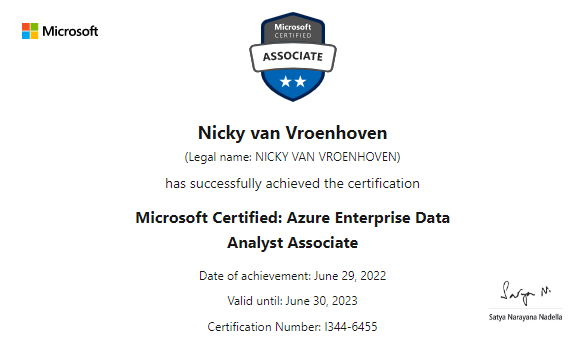
I noticed this weekend that several other people received their results on the DP-500 exam: Designing and Implementing Enterprise-Scale Analytics Solutions Using Microsoft Azure and Microsoft Power BI, so I thought I'd check out mine too.
DP-500 History
- Microsoft Power BI, including some external tools
- Microsoft Purview (a.k.a. Azure Purview)
- Azure Synapse Analytics
- Azure Data Lake Gen2
- DevOps
At the end of June, the exam went live, so it's no longer in beta. This also means there is now an official course available. Although I think you could manage just fine with all the online material there is already. I mentioned quite a few in my last post. And new materials have already been added to that list, for example the newest course on PluralSight, called Optimize Enterprise-scale Data Models - DP-500, by friend and fellow MVP Nikola Ilic (@DataMozart, B).
Never stop learning
- Query and transform data (mainly Synapse questions for me I
thinkhope π)
This part of the exam covers: - Query data by using Azure Synapse Analytics
- Ingest and transform data by using Power BI
- Explore and visualize data (also mainly Synapse, and some R/Python in Power BI probably)
This part covers: - Explore data by using Azure Synapse Analytics
- Visualize data by using Power BI
Renewed Certification
Featured Post
Power Apps or Translytical Task Flows?
I think I have gotten this question at least five or six times in the last few months, and with Translytical Task Flows reaching GA in the M...
-
Just before the holidays start, I'd like to share this little trick I came across in Power Query. I recently had the need to remove zero...
-
Let me be clear: I really like and support the updates that Rui Romano has been pushing the last years! In short, it brings: Better support...
-
I think I now got this question 4 times in the last months, so I thought I'd write it down so I can reference it later, and point people...