Friday, April 7, 2023

MVP Global Summit 2023 here we come!

Hey there, fellow Power BI, Power Platform and tech enthusiasts! 

I'm excited to share with you that I'll be attending the MVP summit on April 18-20 for the first time in-person as an MVP. It's been a long time since there was an in-person MVP Summit, so I'm looking forward to the experience!


For those of you who may not be familiar with the MVP program, it stands for Most Valuable Professional. It's a program run by Microsoft, celebrating 30 years this year, that recognizes exceptional technical community leaders who share their passion, expertise, and real-world knowledge of Microsoft products with others.


Being selected as an MVP is a great honor, and I'm humbled to be part of such a fantastic community. The MVP summit is an annual event where MVPs from around the world gather to meet with Microsoft product teams, provide feedback on upcoming products, and share ideas and best practices.


This year's summit will be a hybrid event, meaning that some attendees will be joining virtually, while others will be attending in person. I'm grateful to have the opportunity to attend in person and to meet with other MVPs and members of the (Power BI) product team face-to-face!


As a first-time attendee, I'm not entirely sure what to expect, but I'm eager to learn, network, and share my experiences with others. I'm also excited to hear from the product teams about what's coming next in the world of Microsoft products.


I also want to thank everyone supporting me in my journey, my family, readers of my blog, attendees at conferences and also my employer Powerdobs B.V..


Overall, I'm thrilled to be attending the MVP summit and grateful for the opportunity to connect with others in the tech community. I'll be sure to share my experiences with you all once the event is over, so stay tuned!

Tuesday, January 10, 2023

Power BI 2022 In Review: My Favourite Features

Last night we had a work meeting at Powerdobs, with a few presentations about business updates, new joiners in the coming months and Power BI projects. I had the pleasure of closing the evening with a presentation on Power BI.


So I decided to do a presentation on my favourite additions to Power BI over the past year. But instead of doing a regular PowerPoint presentation, I decided to do an all-Power-BI presentation. It was very well received and I was encouraged to share it here!
Without further ado, here is the report: πŸ˜€    


In future posts I will dig into the details of this report and let you know how I created it.
I'll also explain why I did (not) include certain features.

For writing this post I was inspired by Kasper's Power BI year 2022 in review and Marco's What happened in the DAX world in 2022.

Let me know what you think, any comments/additions/improvements are welcome!
Do you think I missed features in this review from the last year?

Friday, December 30, 2022

Closing out on 2022

It's the holiday season again. This year flew by if you ask me.
As I did last year, I like to close this year with a little review and mention a few of the things I did.

Blogging

I can at least say I did a bit better than last year, writing a total of 12 posts this year. I still like to get some more time for writing posts, but motivation is still not easy... On the kind of posts: I like in-depth technical ones, where I explain a specific problem or solution I've come across.
And I've also written a lot about Administration and Governance type of topics, like:

Speaking

Luckily, in-person speaking has returned again. I think I can speak for everyone if I say that we missed that very much the last year(s).
I've had some great speaking gigs this year, like a virtual presence at SQLBits, The Dutch Power BI User Day (Deep Dive as well as the free Saturday), DataGrillen, and (both virtual) New Zealand Business Applications Summit and the Pakistan Power Platform Bootcamp.
While I didn't have the pleasure to speak at dataMinds Connect this year, I did attend it with a few colleagues, which was again awesome!

MVP

I've been awarded Microsoft Most Valuable Professional in the Data Platform category for the 3rd time in a row now! 

Learning goals

In May, I took the (then beta) exam DP-500 (Azure Enterprise Data Analyst Associate) and in early July I got the confirmation of receiving the certification!

Are you still interested in taking this exam? Have a look at my overview post.

I didn't do much reading, in books that is. I've read numerous blog posts, but not really any books. Let's up that game in 2023 and put in effort to do more reading.

I do like listening to podcasts, ranging from running (Susy Q&A, Klaas en Koen lopen weg) to tech (Knee-Deep in Tech, Kasper on BI, Explicit Measures). I like to listen to them during my morning or lunch walks and sometimes during running also.


Powerdobs

In February of this year, I started my job as the Unit Lead Power BI at Powerdobs B.V. It's a small consultancy company based in 's-Hertogenbosch, focused on the Azure Data Platform and Power BI. We now have 8 consultants (in one month 9 πŸ˜€), with some backend, some front-end and a few both.
As the Unit Lead for Power BI (Sjoerd Donker is Unit Lead Data Engineering), next to client engagements, I am responsible for spreading knowledge about Power BI and also getting my colleagues excited about sharing knowledge, inside but also outside the company, through blogs and presentations.

I definitely thought my move to Van Lanschot Kempen (my previous employer) was the best I would ever make, because of the permanent employenent, less travelling and building a solid relationship and solutions inside one company.
However, I missed the point of being with my hands on the buttons of Power BI a bit, so I couldn't resist taking the chance to join this family of Power BI enthusiasts at Powerdobs. And it truely feels like a little family here! πŸ’›

Sports/health

With a last year of running just over 1800 km's, I was a bit fed up with running in the first quarter of this year.


This year my total will be around 1120 km, so a lot less then last year, but I can definitely say I ran much more effectively. For example: I used to go running to and from the interval training at the club (4.5K), just to get more K's in. Now I take the bike to the training, so the training itself can be more effective, especially with an interval training.
On the half marathon goal (of 90 minutes): I had one try in October in Eindhoven, but that didn't go as planned. 😐
I still love the fact that all the #runhappy buddies are going strong!

Next to running I've also been doing a bit more workouts at home, being mainly pilates and strength exercises (with the Skimble app) to complement the running, and the last monhts also some yoga to start the day.

I've also been doing some cold showers and Wim Hof (a.k.a. the Iceman) breathing exercises once in a while the last year. But in the beginning of October I've had the pleasure of attending a Wim Hof (half day) workshop, on mindset, breathing and cold. So I took an ice bath! 😁


After that day, I've been consistently doing a cold shower every morning now! It feels amazing going through that stress and adrenaline rush in the morning, and feeling relaxed after a few seconds of focussing on my breathing.
I just have to get the breathing exercises incorporated more into my daily routine also.


That's all for this year. I whish everyone the best New Year's Eve and a great start of 2023!


Nicky. Out.

Monday, December 19, 2022

SSMS Error when refreshing a Power BI Table: Paramter name already exists

2 weeks ago I talked about A No-Code Method to Refresh One Table From a Power BI Dataset in the Service. I recently ran into an error using this method, so I thought it was worth sharing this error, and the solution πŸ˜€, with you.

TL;DR

Don't use the initial catalog when you're connecting to a Power BI dataset with SQL Server Management Studio (SSMS).
If you want to now more details about the exact problem and solution, please read on below.

Problem

In my previous post I mentioned:

"With some tools it might be necessary to also provide the Initial Catalog (the dataset to connect to in your workspace). The datasets in your workspace will eventually show as databases under your AS-server:"

I did specifically say some tools, and might. 😁
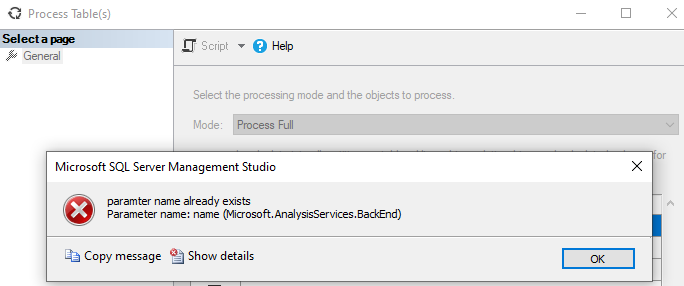
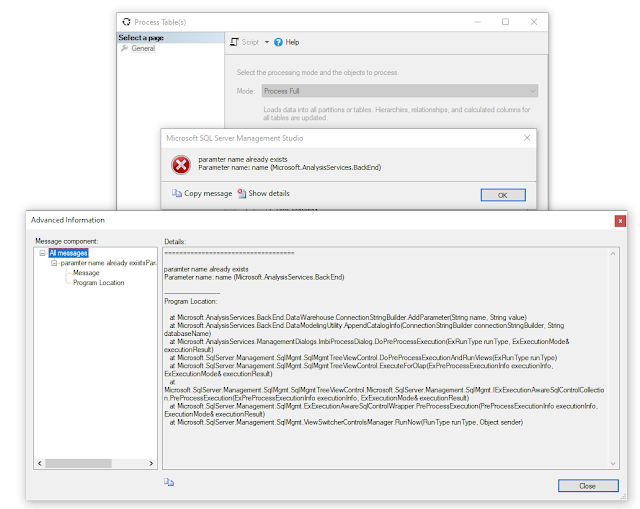
So, to be even more specific, when using SSMS Γ‘nd the option for initial catalog, you run into the below error message:


I tried a few things before I got asked for some (external) help. A little bit of context around the problem:
  • Note that the message itself also has a typo in it (paramter πŸ˜‚).
  • It happens to every table in every dataset (I tried so far) in this workspace. I tried another workspace and that refreshed fine from the UI.
  • A colleague is getting the same error message in the UI for this particular workspace.
  • Looking at the error I checked if there are params called name in the datasets, but there aren't.
  • It's a test workspace in a deployment pipeline.

Solution

Luckily the solution is very simple! 
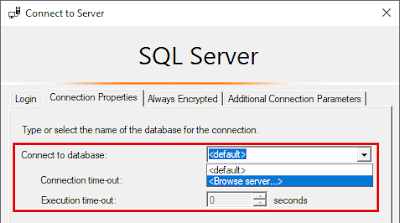
  • Don't use the Initial Catalog option in combination with SSMS, leave it at <default>
  • Or, if for any reason you need the above option selected, install SSMS 19 Preview 4
    • This preview version is a side-by-side installation, so it installs next to SSMS 18.x

I hope this helped you if you encountered the same problem.

Monday, December 5, 2022

A No-Code Method to Refresh One Table From a Power BI Dataset in the Service

Context

A few weeks back I was working on a dataset at a client where I needed to import Excel files from a folder into said dataset. I filtered the files on a prefix and loaded around 30 files of the same structure to a table in my dataset. The Excel files are exports from a budgetting system (I know, right?) that have to be updated multiple times in the next coming weeks on an ad-hoc basis.

After the Excel files are updated I currently have 2 choices:

  • Open the pbix-file and refresh the specific table that loads the files, and then publish to the service. This however again triggers a refresh in the service after publishing. Depending on the connection I have in the pbix (subset of rows from dev/test/prod) I might have to wait for the refresh in the service anyhow
  • Refresh the dataset in the service and wait for that to finish
And it's not that the dataset is thΓ‘t big, but of course waiting (for 20 to 30 minutes) for a refresh would be a waste of time. And it doesn't really matter how long it exactly takes, if you're waiting for something, it always takes too long, right?

Solution

But as you might have noticed from the title of this blog, there is also another solution πŸ˜€.
Spoiler alert: you do need a Premium license.

Marc Lelijveld previously talked about the automation of triggering a single table to refresh in the Power BI Service, with PowerShell and a TMSL script. 

But what if you're not (that) familiar with PowerShell and / or TMSL? And maybe it's not going to be part of an automated schedule, but you just want to be able to execute it ad-hoc, when necessary?

Luckily there's the XMLA endpoint to the rescue. You can connect to any Premium (Capacity or Per User) workspace via the XMLA endpoint with SQL Server Management Studio (SSMS) to do a (single) table refresh.


There's a few things you'll have to consider before being able to do this..

  • Enable XMLA read-write
  • Get the XMLA endpoint connection string
  • Connect via SSMS
  • Refresh your table(s)
  • Check the outcome of the refresh in SSMS
    • Or alternatively check the refresh history in the service
Let's look at the individual steps in more detail.

Enable XMLA read-write


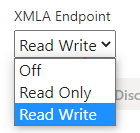
The first thing you need to do is to enable the option Read Write on the XMLA Endpoint of your Premium capacity.

This setting is available in the Admin Portal, either under Capacity settings or Premium Per User, depending on your license.


XMLA Endpoint connection


You can get the connection URL from the workspace Settings page, under the Premium tab.
More info on the documentation page.

Note: Connecting to a My Workspace by using the XMLA endpoint is currently not supported.


Connect via SSMS


Use SQL Server Management Studio to connect to the URL obtained in the previous step. Just be aware that you need version 18.9 or higher to do so.


Make sure you use the following option for Authentication:
  • Azure Active Directory - Universal with MFA
Next to connecting to and looking at properties of your Power BI models, this method also supports executing DAX, MDX, and XMLA queries.

SSMS isn't the only tool supported by the XMLA endpoint, you can pick any of the tools mentioned here, e.g. Excel, SQL Server Profiler, DAX Studio or Tabular Editor to name a few of them.


With some tools it might be necessary to also provide the Initial Catalog (the dataset to connect to in your workspace). The datasets in your workspace will eventually show as databases under your AS-server:


UPDATE December 19th 2022:
When using SSMS and the option to use an Initial Catalog, you (might) run into an error, read my update post how to avoid this.

Refresh your table(s)


Now onto the actual refreshing of my tables. 
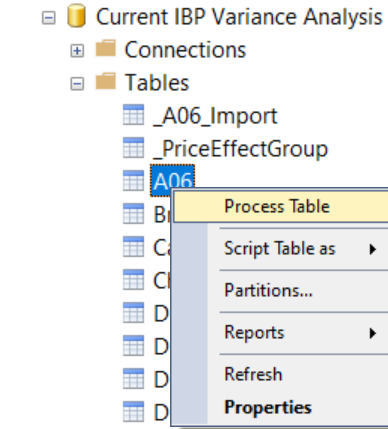
  • Right-click the table you want to refresh and select Process Table


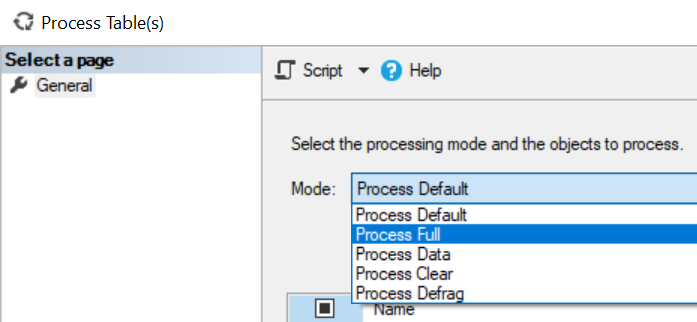
  • Select the right processing option depending on your needs, I used a full refresh
  • Optionally select other tables to refresh
  • Click OK and wait for the refresh to complete.


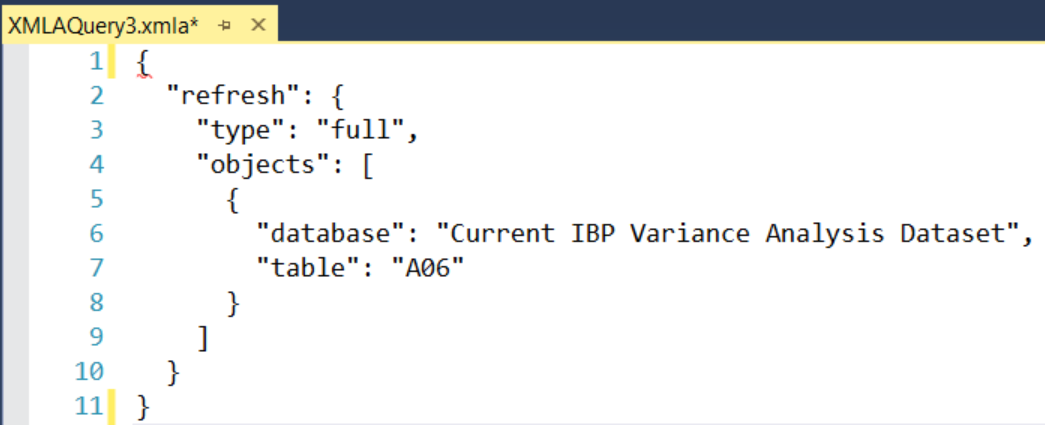
Next to refreshing your table(s) in SSMS, you could also script out the refresh command and use it to automate the process. Because I only need to refresh it on an ad-hoc basis I'm good with my solution for now.


Refresh history


This type of refresh shows as a Via XMLA Endpoint in the Refresh History of your dataset properties in the service.


In any case you ever want to cancel a running refresh, also with Premium and the XMLA endpoint set to Read/Write, have a look at this post how to Cancel a refresh with a SessionID (instead of SPID) and DAX Studio.


Conclusion


In this post I provided a UI-only solution to refreshing a single table in your Power BI dataset. Hopefully this post gave you some insights.
Have you already used this method before?
Do you use it often?
Do you use other methods to refresh a table in a dataset?

I'd love it when you provide more details in the comments!


Monday, October 31, 2022

Let Me Google That For You

In case you're not familiar, let me first explain what I mean with the title.

Let Me Google That For You is a website, that let's you create a demo of how to do a user-specified Google search. It was designed for tech-savvy people that are frequently asked for help. Its purpose is to gently, but sarcastically, point out that by searching for the problem yourself first, you'd probably come a long way to the answer.

While Google is the brand name of a leading internet search engine company, it's also quite commonly used as a verb:
To search the internet for information about (a person, topic, etc.):We googled the new applicant to check her background.
And of course, there's also a Bing alternative: Let Me Bing That For You.

How to google

Because once in a while I see people ask questions that I can (easily) google, I thought it might be worth writing down how I like to perform my searches. 
It might be obvious already, but I like to use Google for that. I find it to be better at its job than others, even for Microsoft tech like Power BI and Power Platform.

When searching for information, there are a few things I like to do:

Start with the topic

Start with a 1 or 2 word, preferably as short as possible, topic, like:
    • Power BI
    • Power Query
    • DAX
    • (Power BI) REST API
    • PowerShell Power BI

Keep it short/to the point

After that, add your question on the topic, but also as short as possible. Try not to add too much filler words like and, or, the and a(n). I also tend to stay away from How do I type of questions.

I like to keep it short and to the point: power bi rest api authorization header

While the search results might not differ thΓ‘t much, the most important thing to me is that Google suggests search words for you. That way you will get the most commonly asked questions to choose from. That's particularly usefull when you don't know exactly what you are looking for.
In case of an error message it's often quite clear, but if you're looking for more general things, or for authorization with an API, you might not know it's called a bearer token.


Errors

In my line of job I unfortunately quite often run into errors. I always use the exact error message that I encounter: word for word. If the error is too long I might try the first part/sentence of it. But keep it exactly as it is. But again, I start with a 1 or 2 word topic, followed by the error message.
A good habit was to create a blog post on the topic if I couldn't find a solution easily. Mainly back in the days when I used to work a lot with SSRS and SSDT.


Ask for help

Sometimes you just can't find it on the interwebs. Then your best bet is to ask for help! There's quite a good chance someone has run into that same problem before.
Ask you co-workers, use Twitter, the Power BI Community, Reddit, a private or public Slack group, whatever works for you.

I'm quite active on Twitter (@NickyvV) and have been using that for over a decade. If you are not, I highly recommend to start doing that. Not only for asking for help, but surely also for the amazing community of Power BI and SQL Server people hanging out there.

There are even specific hashtags you can incorporate in your search: #sqlhelp, #powerbihelp, #pbihelp
Those are monitored throughout they day by a bunch of people that want to give others a hand.
And it's still Twitter, so sometimes you come accross some people that are, let's say, a bit less welcoming.. πŸ˜ƒ 

The majority of interactions is however positive, it's an amazing community!


Searching for Call for Speakers

Because I'm also active in the speaking community, I sometimes like to search for places where I can submit my talks. In my opinion Sessionize is the best platform to use, for speakers as well as conferences. It quickly let's you make a public speaker profile with presentations you can give, but also submit those presentations to conferences without the need to re-enter all the same details over and over again.

Since a while, the website has this Discover events tab which you can use to search for open call for speakers. Before this option was available, and I still do it sometimes to make sure I'm not missing anything on Sessionize itself, I used the option to search for keywords on a specific site on Google:

site:sessionize.com power bi


Closing

With this write-up, I hope I gave you some insights in my daily routine of getting help with things I run into. And to be clear, me having xx years of experience, having a certain title on LinkedIn or being a Microsoft MVP has nothing to do with my amount of searches or things I have to look up.
Sometimes we like to think we do, but we can't know everything. Also, Power BI (and Power Platform) is constantly changing. I would say I'm probably looking for some sort of help more than 20 times a day, every day!

Thursday, September 22, 2022

Power BI Governance & Administration - Naming Conventions


Governance and administration, quite the exciting and popular topic. No? Well, it should be!
As I mentioned in my previous post about Governance and Administration, I have quite some experience and ideas around this topic. I thought it was time to share some of this knowledge and write it down.
I did a few posts on the topic already, including on PowerShell, the Power BI REST API and organizational visuals.


Let's Talk Naming Conventions

So let's start with the question:

What is a naming convention?

"Naming conventions are general rules applied when creating text scripts for software programming."

That's the Techopedia definition, which mostly applies to (traditional) software programming. This still applies to using it while programming SQL, M or DAX for example.
It can be any agreed syntax like one of the following:
  • ThisIsPascalCase
  • thisIsCamelCase
  • this-is-kebab-case
  • this_is_snake_case

But I think it's much broader than using only programming naming conventions these days.
In the context of Power BI, you can use naming conventions in (literally) all things that need a name, like gateways, workspaces, apps, etc.

Why

So why would you want to set up a naming convention for anything?
"They have many different purposes, such as adding clarity and uniformity [to scripts], readability for third-party applications, and functionality in certain languages and applications."
That still mostly applies to programming. I'd argue that in the context of Power BI it's also easier to find things in your Power BI ecosystem. Not only for Power BI/IT Admins, but also for report builders and end users.

How

And how do we set up a naming convention? I would say "it depends". 😁 Take a look at the never ending discussion around spaces or tabs.

I think it's not a matter of how you implement it, but the fact that you think about it, implement it and enforce and/or govern it. It's better to actually think about and agree upon a certain convention then to do nothing.

Where

And where do we use naming conventions? Because they started in traditional programming languages the logical place(s) to start are M and DAX.
I think the below 2 are the best known once for DAX:
  • Always write a Column in the format TableName[Column Name]
  • Always write a Measure in the format [Measure Name]
There are already quite some good resources available that talk about M and DAX:

But besides using naming conventions in programming languages, good places to (start) using them are also:
  • Gateways
    • Gateway cluster/installations itself
    • But also the Data sources in the gateway
      • I like to include the type of gateway (File/SQL/...), location/server/database and the username, because that's still not visible in the new Power Platform Admin Center...
        You can vote for the idea View Username Of A Gateway In Data Source Settings :-) 
  • Workspaces
    • Marc Lelijveld (@MarcLelijveld | B) already did a comprehensive overview of workspace setup and naming conventions in this blog post.
    • The name of a workspace can be 256 characters long, but just because you can, doesn't mean you should, right?!
    • I also find the Implementation Planning docs very helpful, especially the don'ts in a workspace name:
      • The word workspace
      • The words Power BI
      • The name of the organization, unless B2B is used
  • Apps
    • These don't always have to be the same name as the workspace, as the App is usually what all end-users see, and the workspace access is limited to a subset of people.
    • Melissa Coates (@SQLChick | B) does a great job explaing Why to Use a Power BI App
  • Dataflows
  • AAD-groups (used for Power BI)
    • If the groups are used in a workspace, try to include the name/naming convention of the workspace itself, and maybe add the group(s) of users, like [workspace name]-admins/members/viewers
  • Premium Capacities
    • In case you only have 1, then it might make less sense, but in case you have multiple capacities, for me it makes sense to incorporate the type of the capacity in the name. So either P1/2 or the number of v-Cores asigned to that instance
  • Identity & Access Management
    • This might slightly be off-topic for most Power BI users, but if Power BI Admins are working closely with the IT/IAM team/system, and users need to get access to workspaces/apps via IAM, syncing the naming between Power BI, AAD(-groups) and IAM requests might be a good case
  • ...?


Closing

I mentioned a lot of places where naming conventions can be beneficial. I use them because they promote consistency, and can provide more readability and clarity.
Have you implemented naming conventions anywhere? How do you use them? Or why not?

Featured Post

Power Apps or Translytical Task Flows?

I think I have gotten this question at least five or six times in the last few months, and with Translytical Task Flows reaching GA in the M...