Governance and administration, quite the exciting and popular topic. No? Well, it should be! As I mentioned in my previous post about Governance and Administration, I have quite some experience and ideas around this topic. I thought it was time to share some of this knowledge and write it down. I did a few posts on the topic already, including on PowerShell, the Power BI REST API and organizational visuals.
Let's Talk Naming Conventions
So let's start with the question:
What is a naming convention?
"Naming conventions are general rules applied when creating text scripts for software programming."
That's the Techopedia definition, which mostly applies to (traditional) software programming. This still applies to using it while programming SQL, M or DAX for example.
It can be any agreed syntax like one of the following:
ThisIsPascalCase
thisIsCamelCase
this-is-kebab-case
this_is_snake_case
But I think it's much broader than using only programming naming conventions these days.
In the context of Power BI, you can use naming conventions in (literally) all things that need a name, like gateways, workspaces, apps, etc.
Why
So why would you want to set up a naming convention for anything?
"They have many different purposes, such as adding clarity and uniformity [to scripts], readability for third-party applications, and functionality in certain languages and applications."
That still mostly applies to programming. I'd argue that in the context of Power BI it's also easier to find things in your Power BI ecosystem. Not only for Power BI/IT Admins, but also for report builders and end users.
How
And how do we set up a naming convention? I would say "it depends". 😁 Take a look at the never ending discussion around spaces or tabs.
I think it's not a matter of how you implement it, but the fact that you think about it, implement it and enforce and/or govern it. It's better to actually think about and agree upon a certain convention then to do nothing.
Where
And where do we use naming conventions? Because they started in traditional programming languages the logical place(s) to start are M and DAX.
I think the below 2 are the best known once for DAX:
Always write a Column in the format TableName[Column Name]
Always write a Measure in the format [Measure Name]
There are already quite some good resources available that talk about M and DAX:
But besides using naming conventions in programming languages, good places to (start) using them are also:
Gateways
Gateway cluster/installations itself
But also the Data sources in the gateway
I like to include the type of gateway (File/SQL/...), location/server/database and the username, because that's still not visible in the new Power Platform Admin Center... You can vote for the idea View Username Of A Gateway In Data Source Settings :-)
Workspaces
Marc Lelijveld (@MarcLelijveld | B) already did a comprehensive overview of workspace setup and naming conventions in this blog post.
The name of a workspace can be 256 characters long, but just because you can, doesn't mean you should, right?!
These don't always have to be the same name as the workspace, as the App is usually what all end-users see, and the workspace access is limited to a subset of people.
If the groups are used in a workspace, try to include the name/naming convention of the workspace itself, and maybe add the group(s) of users, like [workspace name]-admins/members/viewers
Premium Capacities
In case you only have 1, then it might make less sense, but in case you have multiple capacities, for me it makes sense to incorporate the type of the capacity in the name. So either P1/2 or the number of v-Cores asigned to that instance
Identity & Access Management
This might slightly be off-topic for most Power BI users, but if Power BI Admins are working closely with the IT/IAM team/system, and users need to get access to workspaces/apps via IAM, syncing the naming between Power BI, AAD(-groups) and IAM requests might be a good case
...?
Closing
I mentioned a lot of places where naming conventions can be beneficial. I use them because they promote consistency, and can provide more readability and clarity.
Have you implemented naming conventions anywhere? How do you use them? Or why not?
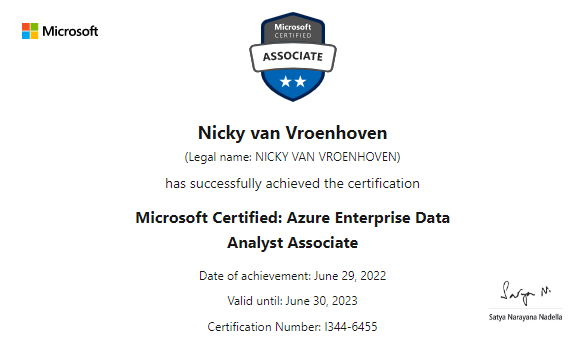
I noticed this weekend that several other people received their results on the DP-500 exam: Designing and Implementing Enterprise-Scale Analytics Solutions Using Microsoft Azure and Microsoft Power BI, so I thought I'd check out mine too.
And you might have already guessed it: I passed! 🥳
As the name of the exam suggests, this is not an exam for beginners. To recap a little bit from my previous blog post, the exam covers the following products/services:
At the end of June, the exam went live, so it's no longer in beta. This also means there is now an official course available. Although I think you could manage just fine with all the online material there is already. I mentioned quite a few in my last post. And new materials have already been added to that list, for example the newest course on PluralSight, called Optimize Enterprise-scale Data Models - DP-500, by friend and fellow MVP Nikola Ilic (@DataMozart, B).
But depending on the type of learner you are, you might do better with an in-class training, so it all depends... 😁
Never stop learning
I honoustly did not think I passed the exam, because it covers quite a few topics I do not master yet, or haven't touched that often.
DP-500 Score report
And according to the scoring report I received, I still have some things to do on the following topics:
Query and transform data (mainly Synapse questions for me I think hope 😀) This part of the exam covers:
Query data by using Azure Synapse Analytics
Ingest and transform data by using Power BI
Explore and visualize data (also mainly Synapse, and some R/Python in Power BI probably) This part covers:
Explore data by using Azure Synapse Analytics
Visualize data by using Power BI
You can check out the detailed outline and all the subtopics off the exam here.
Renewed Certification
Last but not least, I also renewed my PL-300 certification (a.k.a. DA-100), the Power BI Data Analyst Associate. I got a notification that renewal was possible. It only took me 15-20 minutes, online behind my laptop. So no exam site or proctored exam room this time.
I made it with 96% of the questions right, I missed (I think) 1 question in data modeling 😇
Do you have any plans for exams? Did you get any certifications lately?
If you have any remarks and/or questions about one of these topics I mentioned, please let me know!
I've actually started writing several posts, but I either hit a wall, found other (short-term) inspiration to start another post, or just never finished it.
Now to the post of today. I've worked as a Power BI Service (and Power Platform) Administrator quite a while. I started doing admin tasks when I was working for Van Lanschot Kempen, and now at Powerdobs I'm often asked similar questions at clients. So I often run into things related to governance and administration of Power BI and Power Platform environments.
Earlier, I already wrote quite a few posts around these topics:
In our world of data, I don't think we ever stop learning. In January 2021 I got both the DA-100 (now PL-300) and PL-900 certifications. But lately I've been busy learning again for a specific purpose. That purpose is the DP-500 exam, which I have scheduled to take for next week. In case you are wondering: DP-500, is that a new exam? Yes it is! However, it's still in beta. That doesn't have to be an issue, there are just a few things you need to be aware of.
First, you will not immediately get your score after you take the exam, these will only be calculated when it goes out of beta. The exam is still in beta because they want to gather feedback on the quality of the exam and the questions. They might need to fix questions, or improve the quality or accuracy based on the data and comments from the participants. Usually, the scores to the exam will be released 10 business days after the exam goes live.
Second, the exam details page will list the skills measured, as well as a more detailed PDF, but there are no preparation materials, like learning paths, modules or instructor-led training. However, our amazing Power BI community already got you covered for a large part, more on that later.
Next, a good thing: you mostly get a nice discount to beta exams, if you act in time that is 😀. On April 19th, a post went out on the Tech Community site announcing the new exam and a discount code for the first 300 people scheduling it.
Azure Enterprise Data Analyst Associate
Now onto the exam, its full name is: Designing and Implementing Enterprise-Scale Analytics Solutions Using Microsoft Azure and Microsoft Power BI.
Let that sink in for a while. Designing, implementing, an enterprise-scale solution, with Azure and Power BI. That means it will cover the following products/services:
Are you interested to know where this certification/exam fits into the bigger picture, or are you interested in other certifications? Have a look at the Microsoft Certification poster.
Skills measured
This is the overview of the skills measured, you can download a detailed PDF here.
Implement and manage a data analytics environment (25–30%)
Andy and Nikola are also doing a session at Dataweekender covering the skills needed for this exam: The Essential Guide to the new Azure Enterprise Data Analyst Associate Certification
It's a busy time, but there is also lots of fun stuff happening! Besides my move to Powerdobs earlier this year, there are also several interesting conferences that caught my attention! Let me tell you about them.
SQLBits
For starters, at the beginning of this month there was SQLBits, were I (virtually) presented a session called Power Platform Better Together: Create a Scoring App with a Live Dashboard. In this session I showed how to use Power BI, Power Automate and Power Apps to create an interactive application. While I loved to be there in-person, I made the decision earlier this year to present virtual due to all the uncertainty back then. Although I do regret it after seeing all the excitement on social media, I still have some travel plans to other conferences this year.
If you don't know SQLBits, it's probably the greatest Data conference in Europe, spanning a whopping 5 days, including the free community event Saturday.
Here's a few stats from the conference this year:
Over 450 hours of training delivered
232 speakers, over 25% of whom identify as diverse in our industry
67 helpers
Over 1600 attendees Tue-Fri, with almost 2/3 in-person
Plus another 900 registrations for the free Saturday
Attendees from 38 countries
Over £8K raised for Ukraine, in support of two Ukrainian speakers and a Ukrainian helper
Session recordings are still being worked on and will become available for registered attendees. But, in case you missed out, slides are already available at their website.
Power BI Global Summit
I bet the Power BI Summit is known you all, it is the biggest Power BI conference in the world. A multi-day event with speakers from the Microsoft Power BI team’s product group, community experts and MVPs from all around the world. This time I had the honor of hosting a Table Talk around the topic of Power BI Service Administration and beyond at the Global Power BI Summit, with my friends Tom Martens ( B | @tommartens68), Štěpán Rešl ( B | @tpnRel1) and Benni De Jagere ( B | @BenniDeJagere). We actually did it twice that day, in the morning and the evening, to accommodate all time zones across the world.
There was a lot of interaction, people asking questions in chat but also coming on camera for a live chat. We even got some people answering questions from time to time, which is great for the engagement. And that way I also learned some new things!
MVP Summit
Although every conference has its perks, I am pretty sure this is the one I'm most excited about!
As a Microsoft Most Valuable Professional, you are eligible to attend the MVP Global Summit once a year, The event features a large catalog of in-depth technical discussions and feedback sessions, directly with the Microsoft product teams and engineers.
The MVP Award is a global program of recognized technology experts and community leaders who actively support technical communities through unique, innovative, and consistent knowledge sharing. These community leaders actively contribute to support the developer and IT Pro communities worldwide, helping them learn, build, and use our products.
My expectations are high! There will be a lot of demonstrations of functions and features that are not yet publicly available. Of course there are strict Non-disclosure agreements on all sessions on the MVP Summit, but that won't spoil the fun.
Due to the fact that the world is still not 100% back to normal, this year the Summit is still virtual, so the organizers are trying to accommodate all time zones. Most sessions are roughly from 4 PM until 5 AM here in Europe, so that's going to be a tough three days ahead... 😴
Power BI Gebruikersdag
Last but not least, this week also marks the start of the famous annual Dutch Power BI User Day: Power BI Gebruikersdag. It’s a great community event with lot's of local attendees and speakers.
You can have a look at a recap of one of the earlier conferences:
The association behind this user day has had a major overhaul, with 4 new board members, so I'm excited to see what they have been up to!
I'm also delighted to be presenting 2 sessions there:
A (big) look into Query Folding on Deep Dive Friday! I've done Query Folding before, but this is a 2-hour long session going into (all) the depths! 😀
Write-back with Power Apps in Power BI on Saturday, which is a new session, showing off how to use Power Apps inside Power BI to edit data in the backend.
My very last point then, because in June I'll also be attending and speaking at DataGrillen, the only conference (I know of) that has Data, Bratwurst and Beer. 😀 But more about that later.
For everyone attending one of the conferences above, please come and say hi, ask a question, tell a story or just grab a drink and hang out! 💛
Last week it was that time of the month again! No not that time. I mean time for the Power BI February 2022 Feature Summary blog post by Jeroen ter Heerdt of course.
Dynamic M Query Parameters
The new thing is that dynamic M Query Parameters now supports SQL Server (and more data sources). There are several use cases that come to mind and a few people have already blogged about this:
Chris Webb (@cwebb_bi) has a similar approach, but uses a T-SQL Table-Valued Function with 2 parameters
The high level steps to dynamic M query parameters are:
The source (SP/TVF) has to be in DirectQuery mode
Create a parameter(s) in PQ
In the model view, bind that parameter(s) to the column in your datamodel
And then use the parameter(s) in your source in PQ
If you want to read up on all the features, supported datasources, limitations and risks, go read the documentation on how to use dynamic M query parameters.
New mobile formatting options
If you're into mobile formatting for Power BI, you're going to love this update. There's a lot more you can configure, now also independently from the web version.
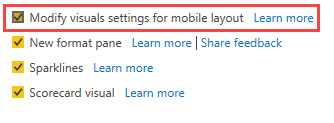
To enable the new mobile formatting pane, the blog post says you'll have to enable the preview feature under Options, but after my installation of the February update it was already enabled:
And more...
Of course there's a lot more in the February update, to mention a few:
If you haven't started using Goals, there are more updates to it, including:
Teams notifications integration,
Multiple owners for a single goal and
The ability to create scorecards in My Workspace
Deployment Pipelines enhancements: there's a (fairly) new Azure DevOps extension and multiple pipelines working together, for example for disconnected reports and datasets
Download .pbix improvements: starting with this release you can download a .pbix file in more scenario's. Specifically, if a report is connected to a dataset that is configured for large models, incremental refresh or has been modified using the XMLA endpoint, you are now able to download that (connected) report, so not the dataset itself 😉
Read up on all the gotcha's and limitations of this export to PBIX.
Now go download that new update and check it out ourself! 😀
Somewhere last year I started reading this book on Power BI. It actually took me quite a while to finish it, because of [reasons]. 😀 But now that I finally finished it, I thought it would be good to write a short review on my thougths about the book, so you know if it is worth your time and money.
I think the combination of good, practical examples and in-depth coverage of (Power BI) features is the best about this book. You can also follow along with the step-by-step examples, as I think going hands-on is the best way of learning things. With reading you can only pick up so much knowledge, while putting it in practice right away enriches the learning experience much more.
Next to that, the book is also filled with best practices for data preparation as well as data modeling.
Soheil is not afraid of touching upon and explaining more advanced and complex topics, like:
Incremental refresh
Calculation groups
Aggregations
The new composite models
Slowly changing dimensions
One point of critique if you will: sometimes I felt that adding color to an image in the book, could get the message across better. But I also get that this makes the pages more crowded, and probably also more expensive, and is not the way Packt publishes their books 😀
All in all I very much enjoyed reading this book! And I definitely learned a lot. I think I knew, or at least have heard of, all the features that were explained in the book. But if you've never used/implemented RLS you don't really know what you're up against. The same goes for aggregations or calculation groups for example. So reading up on those features with good examples has definitely enriched my knowledge.
I've already started reading my next book, so stay tuned for another review!