Thursday, June 8, 2023

Power BI Desktop - Unable To Connect

 Just a quick post on an issue I saw a few people run into lately.

Context

I opened a report with a Live connection to a dataset and I was presented with the error below:

We encountered an error while trying to connect.
Details: "Looks like we're unable to access the dataset. Please contact the owner of the dataset."

Clicking Edit gets you the following dialogue, which might already give you a clue what's happening,


Solution

The answer here is actually really simple, if you know it! 😆 
You have to login to Power BI Desktop with the right account. I was currently logged in with my Powerdobs account, while this was a customer report.

So clicking Edit gave me the datasets in the Powerdobs tenant to connect to, which quickly led me to the conclusion I was logged in with the wrong account.

So to solve this, in the top right corner, click on your name/picture and click Sign in with a different account.


Open the report again and it should connect immediately!
Everyone happy :-)

Monday, May 29, 2023

What Is Microsoft Fabric and Why Should I Care?

As I mentioned in my Build Announcement Summary, Microsoft Fabric has been announced!

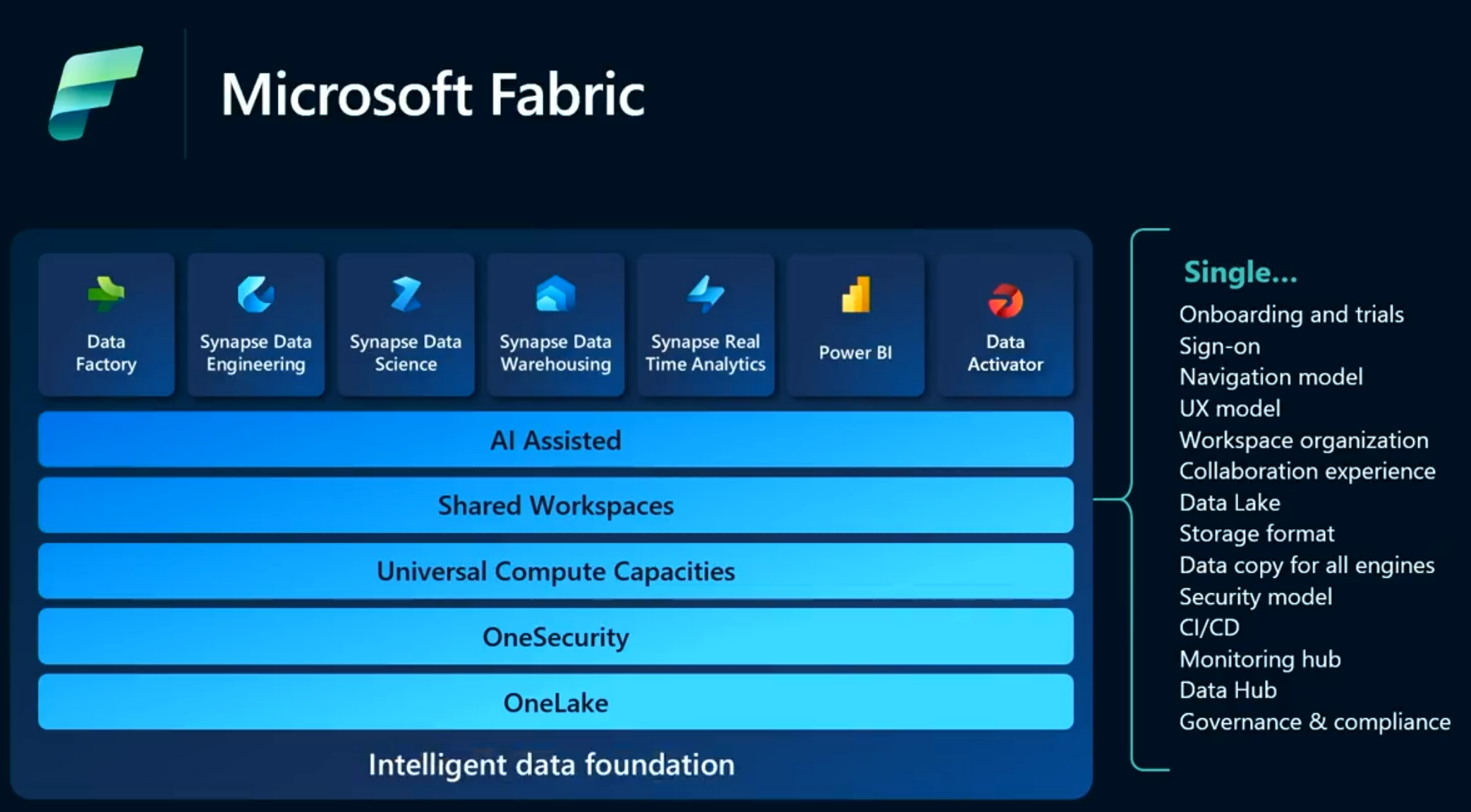
In short, Fabric covers the complete spectrum of services including data movement, data lake, data engineering, data integration and data science, real time analytics, and business intelligence.

Straight to Next up.

It promises to offer end to end analytics from the data lake to the business user, covering the following pillars:

  • Complete Analytics Platform
  • Lake-Centric and Open
  • Empower Every Business User
  • AI Powered


In my opinion this provides the following benefits:
  • A broad set of deeply integrated analytics 
  • Shared experiences that are familiar and easy to learn across all the products
  • All assets to be easily discovered and reused by all developers
  • OneLake, a unified data lake, Microsoft calls it the "OneDrive for data", allowing customers to keep one copy of the data while using the analytics tools of choice 
  • Centralized administration and governance across all workloads

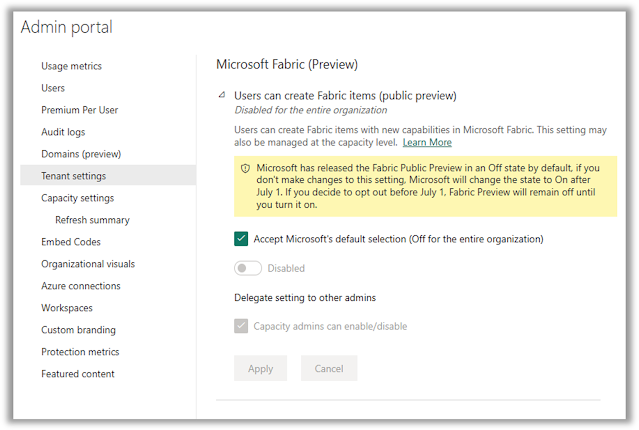
As mentioned in my blog, Fabric is turned off by default, until July 1st, so you will have to enable it to start using it! 


The new Fabric / Power BI home page when you switch on Fabric looks like this:

Fabric home page

And with the button in the left bottom corner you can switch between the different persona's/workloads:

Fabric workload switcher


Microsoft also states clearly that standalone PaaS products will stay untouched and remain active. So there's no need for existing customers to worry about solutions currently in production.

"Existing Microsoft products such as Azure Synapse Analytics, Azure Data Factory, and Azure Data Explorer will continue to provide a robust, enterprise-grade platform as a service (PaaS) solution for data analytics. Fabric represents an evolution of those offerings in the form of a simplified SaaS solution that can connect to existing PaaS offerings. Customers will be able to upgrade from their current products into Fabric at their own pace." by Arun Ulag
I'm also pretty sure that existing customer will be able to migrate to the new SaaS-solution.
If you are familiar with the current Synapse offerings, you might find the following mapping table interesting to have as a reference.

Synapse

Fabric

Pipelines

Data Pipelines

Data Flows

Dataflows

SQL Pools

Data Warehouse

Spark

Spark

Notebooks

Notebooks

Azure Data Explorer (ADX/Kusto)

Real-time Analytics

SQL Serverless

Lakehouse

Synapse Workspace

Power BI Workspace

ADLS Gen2

OneLake

Linked Services

Connections

Datasets

Sources/Destinations

Self-Hosted Integration Runtime (SHIR)

Power BI Gateway

CI/CD, Git

ALM


Although Fabric is still in preview, I would encourage you to try out features and look at the use cases, because:
  • Fabric is based on the serverless paradigm. You don't have to start clusters or manage resource in Azure anymore. Instead, Fabric delivers capacities as a SaaS resource. You can spin up analytics solutions faster and more easily.
  • OneLake makes it easier to:
    • Store large amounts of data
    • Use one accurate, certified and real-time unified source of truth
    • Use shortcuts / mounts to leverages existing data from Azure, AWS or OneLake
  • Analysts can leverage their best skills, be it SQL, Spark or DAX
  • Performance benefits
    Microsoft is working on performance improvements, 1 example is DirectLake, the new storage mode for Power BI. Everyting in OneLake is now in the same open Delta Parquet format.
  • Simplified billing and management of runtime components
    Fabric now brings capacities with compute instead of activities per pipeline or TeraBytes/s. That means we don't have to include multiple factors into the equation anymore
    Instead of managing every resource individually, putting it on pause when you don't need it, you can now provision Fabric capacities, which start at a much smaller price point then a Power BI Premium capacity.  Exact pricing will be announced later.
  • AI will become a bigger part of our daily work, with the integration of Copilot inside Microsoft Fabric and Power BI
    • Generate code and queries
    • Turn words into dataflows and data pipelines
    • Create Power BI reports in seconds
    • Generate DAX calculations
    • Create narrative summaries
This post by Kim Manis has some more details from Microsoft's point of view: Introducing Microsoft Fabric.

Next up?

There are still quite some questions around Fabric that will be answered in the near future I assume, a few that I'm thinking of are:
  • Is the performance of Direct Lake really going to be that good?
  • What is V-order with regards to parquet files and how can we influence/handle that?
  • How will the Processing Units for the Fabric capacities hold up for specific workloads? It will be interesting to see what an F2 capacity can handle for example.
On Microsoft Learn, there are also 4 End-to-end tutorials available to get you started with learning Fabric:
  • Lakehouse
  • Data Science
  • Real-Time Analytics
  • Data Warehouse
But also on more experience-specific topics like Power BI, Data Factory and Price prediction with R for Data Science.
I see you thinking: "So now I need to learn all these new products/services with all the accompanying languages, like T-SQL, Python, R, KQL and what have you...?"
Can you do it? Of course! But I certainly don't think it's a necessity to get to know everything.

For example:
If today you are a Power BI developer, you might want to familiarize yourself with the Data Warehouse load and maybe learn the basics of T-SQL. But with the default dataset that comes with the Warehouse (as is the case with a Datamart), you could as well create a basic and fast report out of that to do some basic visualizations to familiarize yourself with the data, so T-SQL is also optional. 

I'm still very excited with this next step forward by Microsoft and I'm eager to start learning more of Fabric. And also to learn the use cases and all the questions that our customers have!

Wednesday, May 24, 2023

Microsoft Build - Data Announcements Summary

During Build we heard a lot of announcements around data, analytics and AI. Let me give you my summary and take on the things I heard and saw!

In general, AI is going to exist in more and more places in our daily work. Earlier, Copilot was already announced in Power Apps and Power Automate, Outlook and Office products, but also GitHub. I wouldn’t be surprised if it will be embedded in almost every part of our daily work in the future, at least to some extend.

These were my favorite announcements:
  • Microsoft Fabric delivers an integrated and simplified experience for all analytics workloads
  • Data Activator is a new detection system for alerting and taking actions (and part of Fabric)
  • Git Integration: delivered as part of the new Fabric workloads
  • Power BI Desktop Developer Mode will deliver a better experience for developers with a new Power BI Project file-type (PBIP)
Let's dive into a little bit more details about the above topics.

Microsoft Fabric

Fabric promises to offer end to end analytics from the data lake to the business user, covering the following pillars:
  • Complete Analytics Platform
  • Lake-Centric and Open
  • Empower Every Business User
  • AI Powered
Fabric covers the complete spectrum of services including data movement, data lake, data engineering, data integration and data science, real time analytics, and business intelligence.


Fabric makes life simpler for customers with its unified and comprehensive platform. Fabric architecture is based on Software as a Service (SaaS) foundation instead of the traditional Platform as a Service (PaaS), to take simplicity and integration to the next level.
This SaaS experience makes sure that all the data and services used within Fabric are pre-wired together and share the same user experience, much as with Office today. 

But of course, Microsoft Fabric was not the only announcement at Build.


Power BI Desktop Developer Mode

Power BI Desktop Developer Mode is here, at least it will be very soon ! In a nutshell, "Developer Mode" enables you to save a Power BI Desktop file into a Power BI Project (PBIP) and operate on the artifacts stored as a folder in your file system.
Power BI Desktop is expanding to serve a better experience for developers, with capabilities like:
  • Source Control for version history and diffs
  • CI/CD for e.g. Pull Requests
  • Text editor support

Developer Mode also ties into the next point: Git integration in the service!

Git Integration

The long-awaited source control integration!
Next to Developer Mode in Desktop and an easier and better way to merge changes into source control, Microsoft has also started working on source control integration on the workspace level.
Be aware that this is a Premium feature, so only workspaces with a Power BI Premium capacity license can connect to source control.

Data Activator

This is actually a new name we haven't heard that much about.
"It will help customers respond to changes in their data instantly by setting up a system of detection that automatically alerts the team with the right context to take action."
 It looks like a low code/no-code way to take actions on your data. It's only in private preview at the moment, so we'll have to wait a bit to get more info on this. In the meanwhile, you can read the announcement blog.


Conclusion

There's a lot of exciting news shared during Microsoft Build!

Also be mindful that until July 1st, Fabric is disabled by default. After that date, it will be enabled by default, so you (as an admin) have some time to prepare your users or only give a small group of people access to Fabric for example. Thank you Microsoft for listening to the community! You can also start a free 60 day trial: aka.ms/Try-Fabric.
A tenant admin can enable Fabric workloads manually by switching the tenant setting to on.
Taken from the Power BI blog


If you want a complete (textual) overview of all announcements during Build, have a look at the Build Book of News 2023.

If you want to know more details about Microsoft Fabric and the other announcements, or if you want to watch the recordings of other sessions, I suggest starting with the below sessions to get an overview.
A few important sessions to start with:
Blog posts:

After hearing all this exciting news, I'll dive into more details on separate blogs on the above topics.


Thursday, May 11, 2023

Microsoft Build Is Around The Corner

 I think I already shared it earlier, but in case you missed it:


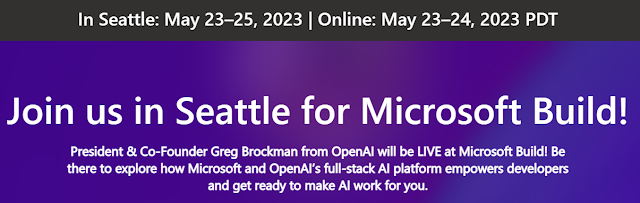
In just under 2 weeks, Microsoft Build (in-person and online conference) is happening with a lot of exciting Power BI and data related updates. You should definitely watch it, either live or the recordings afterwards! It starts at Tuesday, May 23rd, 6PM CEST.

More info and registration: build.microsoft.com


A few important sessions to start with:


I will also share an update shortly after Build to summarize the news and give my feedback on it, so stay tuned!

Friday, April 7, 2023

MVP Global Summit 2023 here we come!

Hey there, fellow Power BI, Power Platform and tech enthusiasts! 

I'm excited to share with you that I'll be attending the MVP summit on April 18-20 for the first time in-person as an MVP. It's been a long time since there was an in-person MVP Summit, so I'm looking forward to the experience!


For those of you who may not be familiar with the MVP program, it stands for Most Valuable Professional. It's a program run by Microsoft, celebrating 30 years this year, that recognizes exceptional technical community leaders who share their passion, expertise, and real-world knowledge of Microsoft products with others.


Being selected as an MVP is a great honor, and I'm humbled to be part of such a fantastic community. The MVP summit is an annual event where MVPs from around the world gather to meet with Microsoft product teams, provide feedback on upcoming products, and share ideas and best practices.


This year's summit will be a hybrid event, meaning that some attendees will be joining virtually, while others will be attending in person. I'm grateful to have the opportunity to attend in person and to meet with other MVPs and members of the (Power BI) product team face-to-face!


As a first-time attendee, I'm not entirely sure what to expect, but I'm eager to learn, network, and share my experiences with others. I'm also excited to hear from the product teams about what's coming next in the world of Microsoft products.


I also want to thank everyone supporting me in my journey, my family, readers of my blog, attendees at conferences and also my employer Powerdobs B.V..


Overall, I'm thrilled to be attending the MVP summit and grateful for the opportunity to connect with others in the tech community. I'll be sure to share my experiences with you all once the event is over, so stay tuned!

Tuesday, January 10, 2023

Power BI 2022 In Review: My Favourite Features

Last night we had a work meeting at Powerdobs, with a few presentations about business updates, new joiners in the coming months and Power BI projects. I had the pleasure of closing the evening with a presentation on Power BI.


So I decided to do a presentation on my favourite additions to Power BI over the past year. But instead of doing a regular PowerPoint presentation, I decided to do an all-Power-BI presentation. It was very well received and I was encouraged to share it here!
Without further ado, here is the report: 😀    


In future posts I will dig into the details of this report and let you know how I created it.
I'll also explain why I did (not) include certain features.

For writing this post I was inspired by Kasper's Power BI year 2022 in review and Marco's What happened in the DAX world in 2022.

Let me know what you think, any comments/additions/improvements are welcome!
Do you think I missed features in this review from the last year?

Friday, December 30, 2022

Closing out on 2022

It's the holiday season again. This year flew by if you ask me.
As I did last year, I like to close this year with a little review and mention a few of the things I did.

Blogging

I can at least say I did a bit better than last year, writing a total of 12 posts this year. I still like to get some more time for writing posts, but motivation is still not easy... On the kind of posts: I like in-depth technical ones, where I explain a specific problem or solution I've come across.
And I've also written a lot about Administration and Governance type of topics, like:

Speaking

Luckily, in-person speaking has returned again. I think I can speak for everyone if I say that we missed that very much the last year(s).
I've had some great speaking gigs this year, like a virtual presence at SQLBits, The Dutch Power BI User Day (Deep Dive as well as the free Saturday), DataGrillen, and (both virtual) New Zealand Business Applications Summit and the Pakistan Power Platform Bootcamp.
While I didn't have the pleasure to speak at dataMinds Connect this year, I did attend it with a few colleagues, which was again awesome!

MVP

I've been awarded Microsoft Most Valuable Professional in the Data Platform category for the 3rd time in a row now! 

Learning goals

In May, I took the (then beta) exam DP-500 (Azure Enterprise Data Analyst Associate) and in early July I got the confirmation of receiving the certification!

Are you still interested in taking this exam? Have a look at my overview post.

I didn't do much reading, in books that is. I've read numerous blog posts, but not really any books. Let's up that game in 2023 and put in effort to do more reading.

I do like listening to podcasts, ranging from running (Susy Q&A, Klaas en Koen lopen weg) to tech (Knee-Deep in Tech, Kasper on BI, Explicit Measures). I like to listen to them during my morning or lunch walks and sometimes during running also.


Powerdobs

In February of this year, I started my job as the Unit Lead Power BI at Powerdobs B.V. It's a small consultancy company based in 's-Hertogenbosch, focused on the Azure Data Platform and Power BI. We now have 8 consultants (in one month 9 😀), with some backend, some front-end and a few both.
As the Unit Lead for Power BI (Sjoerd Donker is Unit Lead Data Engineering), next to client engagements, I am responsible for spreading knowledge about Power BI and also getting my colleagues excited about sharing knowledge, inside but also outside the company, through blogs and presentations.

I definitely thought my move to Van Lanschot Kempen (my previous employer) was the best I would ever make, because of the permanent employenent, less travelling and building a solid relationship and solutions inside one company.
However, I missed the point of being with my hands on the buttons of Power BI a bit, so I couldn't resist taking the chance to join this family of Power BI enthusiasts at Powerdobs. And it truely feels like a little family here! 💛

Sports/health

With a last year of running just over 1800 km's, I was a bit fed up with running in the first quarter of this year.


This year my total will be around 1120 km, so a lot less then last year, but I can definitely say I ran much more effectively. For example: I used to go running to and from the interval training at the club (4.5K), just to get more K's in. Now I take the bike to the training, so the training itself can be more effective, especially with an interval training.
On the half marathon goal (of 90 minutes): I had one try in October in Eindhoven, but that didn't go as planned. 😐
I still love the fact that all the #runhappy buddies are going strong!

Next to running I've also been doing a bit more workouts at home, being mainly pilates and strength exercises (with the Skimble app) to complement the running, and the last monhts also some yoga to start the day.

I've also been doing some cold showers and Wim Hof (a.k.a. the Iceman) breathing exercises once in a while the last year. But in the beginning of October I've had the pleasure of attending a Wim Hof (half day) workshop, on mindset, breathing and cold. So I took an ice bath! 😁


After that day, I've been consistently doing a cold shower every morning now! It feels amazing going through that stress and adrenaline rush in the morning, and feeling relaxed after a few seconds of focussing on my breathing.
I just have to get the breathing exercises incorporated more into my daily routine also.


That's all for this year. I whish everyone the best New Year's Eve and a great start of 2023!


Nicky. Out.

Featured Post

Power Apps or Translytical Task Flows?

I think I have gotten this question at least five or six times in the last few months, and with Translytical Task Flows reaching GA in the M...